 Deploy Intelligence
Infrastructure
The AI tools get all the attention, but the infrastructure underneath is what makes the system reliable. Here's the full stack.
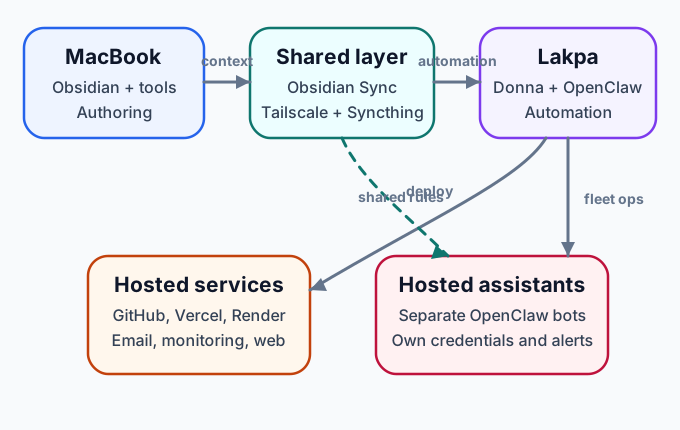
High-level architecture: workstation, always-on AI server, shared sync/network fabric, hosted services, and isolated hosted assistants.
The Machines
| Machine | Role | Location |
|---|---|---|
| MacBook Pro | Primary interactive workstation for Codex, Claude Code, and other AI clients | Portable |
| Mac Mini | Always-on AI host for OpenClaw, Hermes, CLI agents, and scheduled services | Home office |
| Cloud VPS (several) | Hosted assistants, web applications, and operational services | Various providers |
The Mac Mini is the most interesting piece — it's a consumer desktop machine running as a 24/7 AI server. It hosts persistent agents, specialized CLI tools, deterministic scheduled jobs, and a file synchronization node.
Tailscale (Mesh Networking)
Every machine is connected via Tailscale, a WireGuard-based mesh VPN. This means:
- All machines can reach each other by stable IP, regardless of physical location
- SSH works seamlessly between machines without port forwarding or dynamic DNS hacks
- The connection is encrypted end-to-end
- No central server to maintain — it's peer-to-peer
AI tools can connect directly between machines over Tailscale using canonical SSH aliases. Before connecting, they verify the local execution host and resolve the target against a shared environment map. This prevents a remote session from trying to SSH into itself or operating on the wrong machine because of a misleading UI label.
Obsidian Sync (Vault Synchronization)
Obsidian Sync is the authoritative sync mechanism for the vaults themselves. That matters because the constitution, project memory, tickets, and reference docs all live inside Obsidian markdown vaults and need to be consistent across machines.
In practice:
- I update a note on the MacBook
- Obsidian Sync propagates the vault change
- any AI that reads the vault on another machine sees the same source of truth
This is why I treat Obsidian Sync as required infrastructure rather than a convenience feature.
Syncthing (Runtime File Synchronization)
Syncthing handles the broader filesystem outside the vaults — running over Tailscale only (no public internet relay, no discovery servers).
Two broad synchronization areas:
- Shared transfer space — ordinary files that need to move between the MacBook and Mac Mini
- AI runtime space — the canonical skills, job definitions, model policy, credentials, wrappers, and operational scripts used by AI clients and agents
So the division of labor is:
- Obsidian Sync for the vaults and human-readable AI context
- Syncthing for runtime files, credentials, wrappers, and machine-to-machine support files
Obsidian (Knowledge Management)
Obsidian is where all human-readable knowledge lives — the constitution, project documentation, tickets, memory files, reference data. I chose it because:
- It's just markdown files in folders — no proprietary format, no lock-in
- Files are accessible to AI tools as regular filesystem paths
- It has excellent search and linking for human use
- The folder structure maps naturally to the context hierarchy
I maintain three vaults:
| Vault | Purpose |
|---|---|
| AI | Cross-cutting AI context (the constitution lives here) |
| Work | Employer work, my company's projects, infrastructure |
| Personal | Personal life, finances, personal projects |
Projects and repositories can have their own AI/ folder with memory, references, and context specific to that scope. Those folders may live in an Obsidian vault or alongside the project repository, depending on whether the material is primarily human knowledge or repo-local operating context.
Credential Management
One of the earliest hard rules: never hardcode credentials. The system works like this:
- All credentials live in environment files (
.envformat) under one canonical synchronized credentials tree - Runtime wrappers source only the credential files needed for the requested service and identity
- Scripts consume credentials through environment variables rather than embedded values
- AI tools are told where to look and told not to guess if something is missing
Each service or identity scope gets its own credential file. This makes credentials easier to rotate and audit, and reduces the chance that one process receives access unrelated to its task.
Server Architecture
Web applications run on a managed hosting setup:
- ServerPilot manages the web server on the primary VPS — handles Nginx, SSL, PHP if needed, and user isolation
- Cloudflare sits in front for DNS, SSL termination, and CDN
- Static sites (like this one) are built locally and deployed via
scp - Dynamic applications use platforms like Render and Vercel
For AI-specific infrastructure (like hosted OpenClaw instances for others), I use Hetzner VPS instances. They are isolated by credential and runtime boundary, even though they can still participate in the Tailscale mesh for maintenance and monitoring.
Security Posture
The security approach follows a few principles:
- Key-only SSH everywhere — password authentication is disabled on all servers
- Least-privilege network exposure — services are private or tailnet-only unless they need to be public
- Identity separation enforced at every layer — separate GitHub accounts, SSH keys, credentials, and service scopes for personal and work contexts
- Protected execution configuration — persistent AI hooks and tool settings require explicit approval because they can execute code on every tool call
- Privacy-aware model routing — confidential material is restricted to approved local or zero-retention inference paths
- Observable fallbacks — changes in provider, billing source, or trust boundary generate alerts rather than remaining silent
How It Fits Together
The full picture:
- A request arrives through conversation, Basecamp, OmniFocus, or a registered recurring job
- Obsidian Sync keeps the constitution and human-readable context consistent across machines; Syncthing carries the shared runtime and credentials
- The executing agent bootstraps, verifies its host and identity, and loads the relevant project context
- Deterministic work runs directly as a script; judgment-heavy work runs through OpenClaw, Hermes, or an interactive coding agent
- Coding work happens on a branch and opens a pull request
- Independent reviewer models inspect the PR according to its risk tier
- The agent reports the verified outcome through the job's declared delivery route
- I review the product result and authorize consequential external actions
Much of this happens without me touching a terminal. Obsidian Sync, Tailscale, Syncthing, the shared policy layer, and explicit job definitions make the automation repeatable rather than dependent on whichever model happens to receive a prompt.